⚡ Uttar Pradesh Power Corporation Limited (UPPCL) Information Portal ⚡
A Simplified Guide for Electricity Bill Check, Online Payment, New Connection Application & Complaint Registration
Managing your electricity connection in Uttar Pradesh has become fully digitalized. Citizens no longer need to stand in long queues at local electricity offices. Through official UPPCL digital portals, consumers can conveniently check electricity bills, process online payments, apply for new service connections, and track complaint statuses directly from their smartphones or computers.
This portal is designed to provide step-by-step guidance, official direct links, and helpful instructions to assist users in navigating various UPPCL utilities easily. Whether you belong to urban or rural electricity distribution circles, our comprehensive guides cover all major DISCOMs operating across Uttar Pradesh.
About UPPCL: Uttar Pradesh Power Corporation Limited (UPPCL) is the apex body responsible for electricity transmission and distribution in Uttar Pradesh. Power distribution is handled via five major subsidiary companies: Purvanchal (PUVVNL), Paschimanchal (PVVNL), Madhyanchal (MVVNL), Dakshinanchal (DVVNL), and KESCO (Kanpur Electricity Supply Company).
How to Check & Pay Your UPPCL Electricity Bill Online
Checking and paying your monthly electricity bill online requires your unique Account ID / Consumer Number. Follow these standard procedures to check your outstanding bill balance and complete your payment securely through official payment gateways:
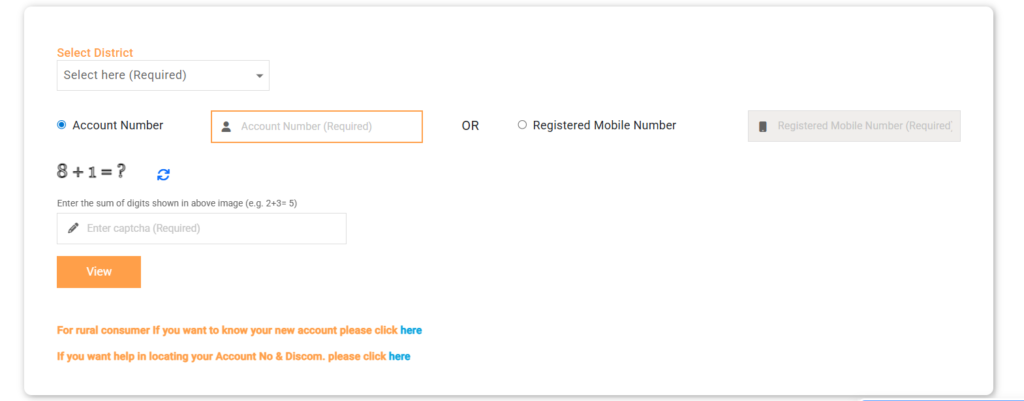 Step 6 To make a payment, click on the Pay Now button.Step 7 Verify consumer details, mobile number, and invoice amount.Step 8 Choose your preferred payment method (UPI, Debit/Credit Card, Net Banking) and authorize the transaction.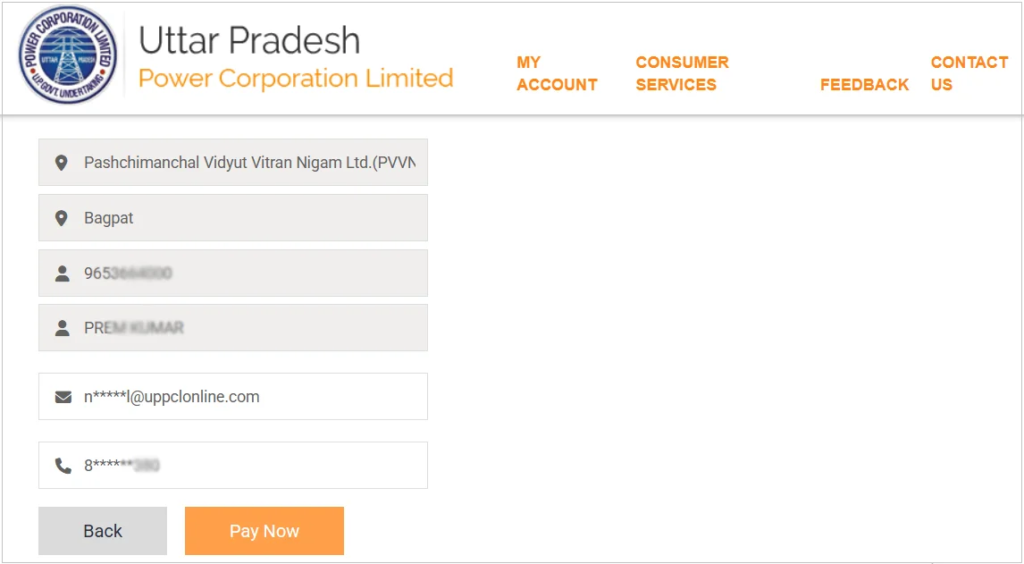
Accepted Online Payment Modes
- UPI Payment Applications: Google Pay, PhonePe, Paytm, Amazon Pay, BHIM UPI.
- Debit & Credit Cards: RuPay, Visa, MasterCard, Maestro.
- Internet Banking: Available for all major Indian nationalized and private banks.
- Digital Wallets: Supported mobile wallets via official payment aggregators.
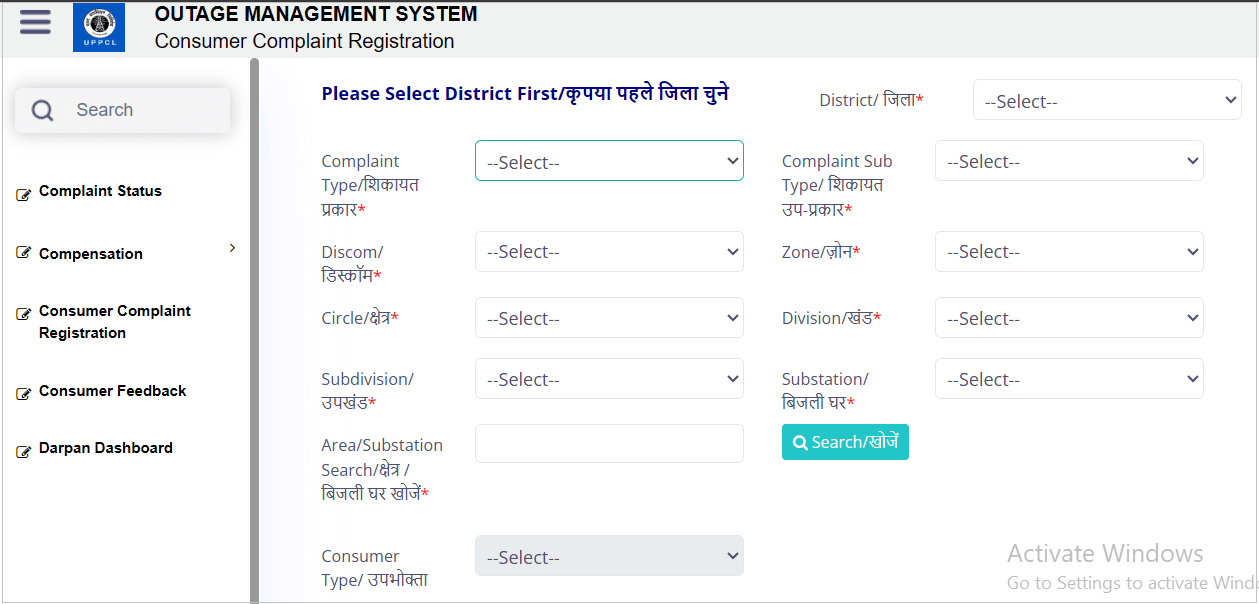
How to Register an Online Electricity Complaint
If you are experiencing power outages, meter defects, transformer faults, or incorrect bill billing details, you can register a formal complaint with UPPCL online for rapid resolution.
Applying for a New UPPCL Electricity Connection
New domestic, commercial, or agricultural power connections in Uttar Pradesh are processed through the Jhatpat Connection Portal. Applicants need to upload essential documents and pay nominal processing fees online.
Required Documents Checklist
- Identity Proof: Aadhaar Card, Voter ID, PAN Card, or Passport.
- Proof of Ownership / Occupancy: Property Deed, Registry Document, Allotment Letter, or Rent Agreement.
- Photograph: Recent passport-sized photograph of the applicant.
- Address Verification: Valid government ID or previous bill copy (if applicable).
UPPCL Electricity Distribution Companies (DISCOMs) Coverage
UPPCL functions through five subsidiary distribution companies covering distinct geographical regions across Uttar Pradesh:
| DISCOM Name | Operational Districts & Coverage Area |
|---|---|
| PUVVNL (Purvanchal) | Varanasi, Prayagraj, Gorakhpur, Azamgarh, Ghazipur, Deoria, Jaunpur, Mirzapur, Sonbhadra, Basti, Ballia, Chandauli, Sant Kabir Nagar, Mau, etc. |
| PVVNL (Paschimanchal) | Meerut, Saharanpur, Muzaffarnagar, Ghaziabad, Gautam Buddha Nagar (Noida), Bulandshahr, Bareilly, Moradabad, Bijnor, Rampur, etc. |
| MVVNL (Madhyanchal) | Lucknow, Ayodhya, Sitapur, Hardoi, Unnao, Rae Bareli, Lakhimpur Kheri, Barabanki, Gonda, Bahraich, Fatehpur, etc. |
| DVVNL (Dakshinanchal) | Agra, Mathura, Aligarh, Jhansi, Firozabad, Mainpuri, Etah, Banda, Chitrakoot, Farrukhabad, Etawah, Mahoba, etc. |
| KESCO (Kanpur) | Kanpur City (Metropolitan Urban Area Only). |
📞 UPPCL 24×7 Customer Care Helpline
Call toll-free for emergency power restoration, billing complaints, or transformer failure reporting.
Headquarters: Shakti Bhawan, 14 Ashok Marg, Lucknow, Uttar Pradesh – 226001
DISCOM Specific Helpline Numbers & Support Emails
If you require direct assistance from regional management, contact your respective DISCOM helpdesk:
| DISCOM Name | Toll-Free Helpline | Official Email Address |
|---|---|---|
| PVVNL (Paschimanchal) | 1800-180-3002 | md@pvvnl.org |
| PUVVNL (Purvanchal) | 1800-180-5025 | md@puvvnl.in |
| MVVNL (Madhyanchal) | 1800-1800-440 | cccmvvnl1912@gmail.com |
| KESCO (Kanpur) | 1800-180-1912 | kescohelpline@kesco.org.in |
| DVVNL (Dakshinanchal) | 1800-180-3023 | dvvnlmd@gmail.com |